Physical Address
304 North Cardinal St.
Dorchester Center, MA 02124
Physical Address
304 North Cardinal St.
Dorchester Center, MA 02124

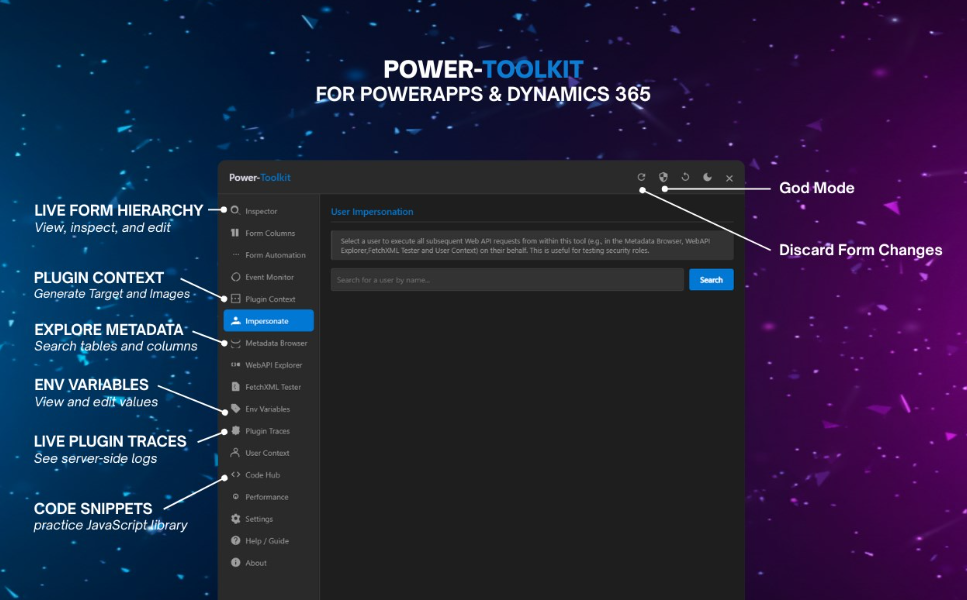
If you’re building or debugging Model-Driven Power Apps, the Power-Toolkit browser extension by Mohammed Khawatme is a must-have. Designed specifically for developers and advanced makers, this extension brings a suite of powerful tools directly into your browser—making it easier than ever to inspect, debug, and optimize your apps in real time.
Power-Toolkit is a client-side developer tool that enhances your experience working with Power Apps and Dynamics 365. It provides a tab-based interface packed with features for inspecting form data, monitoring events, simulating plugin contexts, and interacting with the Dataverse Web API.
You can install Power-Toolkit from your preferred browser:
Once installed, the extension becomes available while working in Power Apps Studio or a model-driven app form. No additional setup is required—just open your app and start exploring.